
The Beacon Season 1, Goblin’s Gambit, launched May 25, 2026 with a 7.7 million BCN reward pool. This free-to-play pixel-art roguelite lets players earn Umbra Shards through dungeon runs and use them through Umbra Chests or Kraken Klash. Premium access is optional. This quick-start guide explains the essential first steps for new players entering Season 1.
For a broader description of the game, including its setting, gameplay structure, economy, and current status, see our The Beacon game overview. This guide focuses on the practical first steps for new players entering Season 1.
This is not a full review. It is a practical beginner guide based on official Season 1 documentation, early hands-on testing, and selected community observations from the launch period.

Best Way to Start The Beacon
The Beacon can be accessed through the web app or through the Epic Games Store. The official Season 1 documentation recommends using the Epic Games version if browser performance is poor. In early testing, browser access failed several times, while the Epic version eventually allowed gameplay to start.
For new players, the practical recommendation is simple: start with the browser if preferred, but switch to Epic if the web version fails to connect, performs poorly, or gets stuck before gameplay.
Season 1 Context
The Beacon Season 1: Goblin’s Gambit is the game’s first live seasonal experience. It launched on May 25, 2026, with dungeon progression, Kraken Klash, chest rewards, Premium access, and BCN reward pools. For the full launch summary, see our The Beacon Season 1: Goblin’s Gambit news update.
Season 1 is expected to run until approximately June 14, 2026. Since this is a live event, details such as balance, access conditions, rollout timing, and reward rules may change during the season.
Starting in Town: Where to Go First
After entering The Beacon, new players start in the town hub rather than directly inside a dungeon. This area acts as the main navigation space, with access to dungeon runs, The Cellar, character-related menus, town vendors, and seasonal systems. Before starting a run, it is worth spending a short time understanding the layout so the first session feels less confusing.
- Dungeons are to the north: To begin the main roguelite gameplay loop, head toward the northern gate. This is where players enter dungeon runs, choose a weapon, spend stamina, defeat enemies, and earn Umbra Shards.
- The Cellar and Kraken Klash are to the northeast: Kraken Klash is accessed from the northeast side of town. This is the board-style prediction activity where Gobloonz are used to tribute on tiles.
- Town vendors and NPCs: The town includes several vendors and characters, but they do not all need to be understood before the first run. For beginners, it is better to treat the town as a hub: find the dungeon entrance first, then come back later to explore shops, cosmetics, housing, pets, and seasonal systems.
- Check your character and inventory: New accounts may start with a basic character and no equipped cosmetics, pets, or items. These areas become more relevant as rewards are earned through chests and seasonal progression.
For a first session, the most straightforward path is to check the town layout, go north for dungeon runs, earn Umbra Shards, and only then explore The Cellar and Kraken Klash once Gobloonz become relevant.

Basic Controls and Keybindings
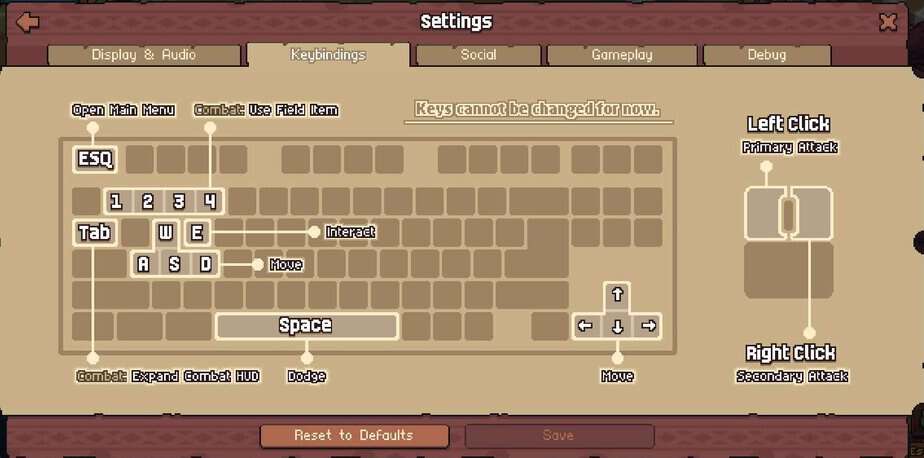
Before entering a dungeon, it is worth checking the keybindings menu. The Beacon uses a familiar PC action-RPG control setup, but some important combat and interface actions are spread across the keyboard and mouse.
- Move: W, A, S, and D.
- Alternative movement: Arrow keys.
- Primary attack: Left mouse click.
- Charged attack: Hold and release left mouse button for a stronger hit.
- Secondary attack: Right mouse click.
- Dodge: Spacebar.
- Interact: E.
- Open main menu: Esc.
- Combat HUD: Tab.
- Combat abilities and item slots: Number keys 1, 2, 3, and 4.
The keybindings screen notes that keys cannot currently be changed. New players who usually rely on custom key layouts should check the controls before starting a dungeon run.
The Basic Season 1 Gameplay Loop
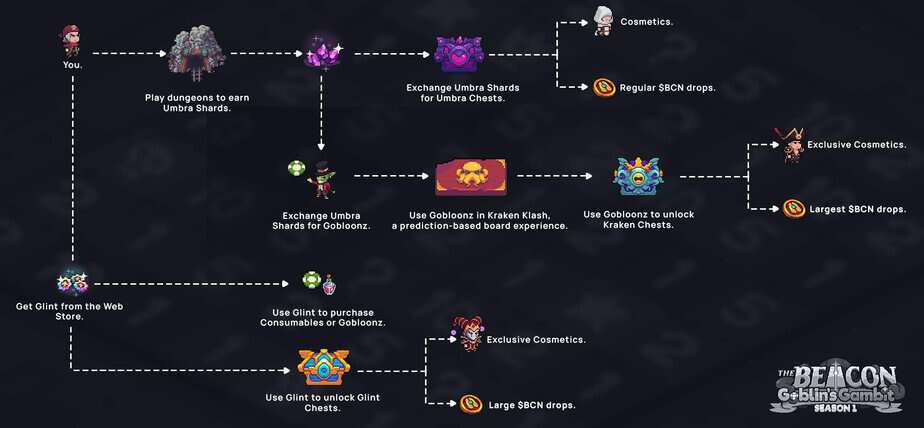
The main Season 1 loop starts with dungeon runs. Players enter dungeons, defeat enemies, collect Umbra Shards, and then decide how to use those shards. Umbra Shards can be used to open Umbra Chests, or converted into Gobloonz for Kraken Klash in The Cellar.
- Run dungeons: Dungeons are the core gameplay activity and the main source of Umbra Shards.
- Earn Umbra Shards: Umbra Shards are the main Season 1 gameplay currency.
- Open Umbra Chests: This is the direct reward path using dungeon-earned shards.
- Convert shards into Gobloonz: Gobloonz are used in Kraken Klash, a separate prediction-based board activity.
- Track rewards: Season 1 rewards are connected to chests, cosmetics, and BCN reward pools.
A simple beginner path is to start with dungeon runs, learn combat, collect Umbra Shards, and only then decide whether to use those shards for Umbra Chests or convert them into Gobloonz.
How Dungeon Runs Work
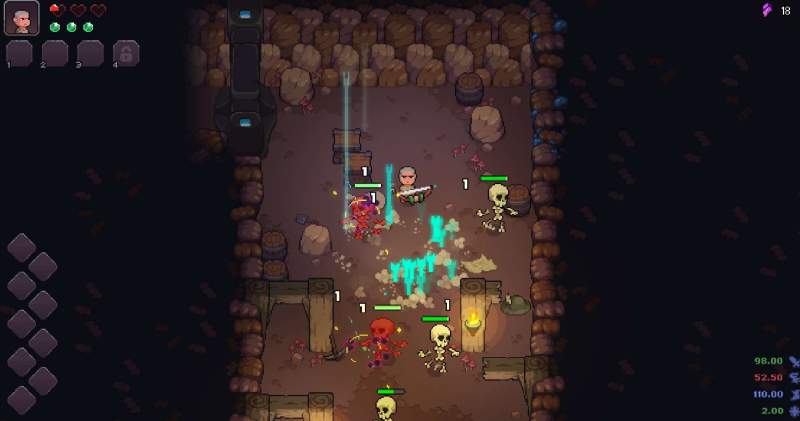
Dungeon runs are the core gameplay experience in The Beacon. They are fast-paced roguelite runs with enemies, hazards, upgrades, field items, and rewards. Dungeon layouts, enemy combinations, upgrade paths, and rewards can change between runs, so each run asks players to adapt rather than repeat the exact same route.
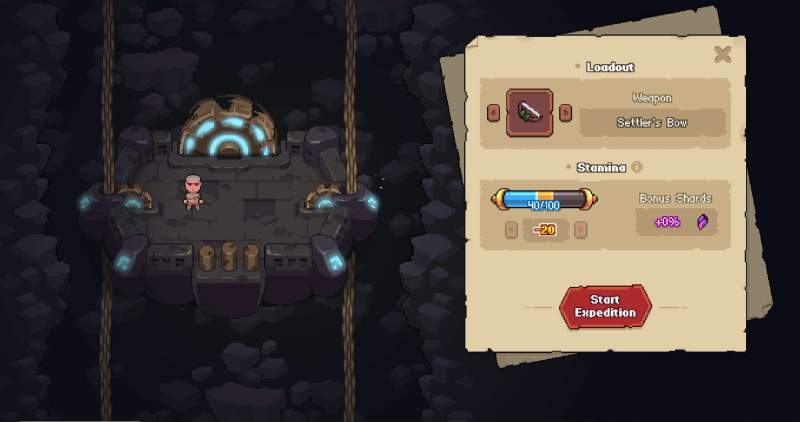
To start a dungeon run, players leave through Dawnport’s northern gate. Before entering, they choose a weapon class and decide how much stamina to commit to the run.
Each run starts fresh. Upgrades and power-ups collected during a run do not carry over into the next one, so dungeon progression is based on adapting to the current run, choosing useful power-ups, and surviving long enough to collect rewards.
Weapons and Combat Basics
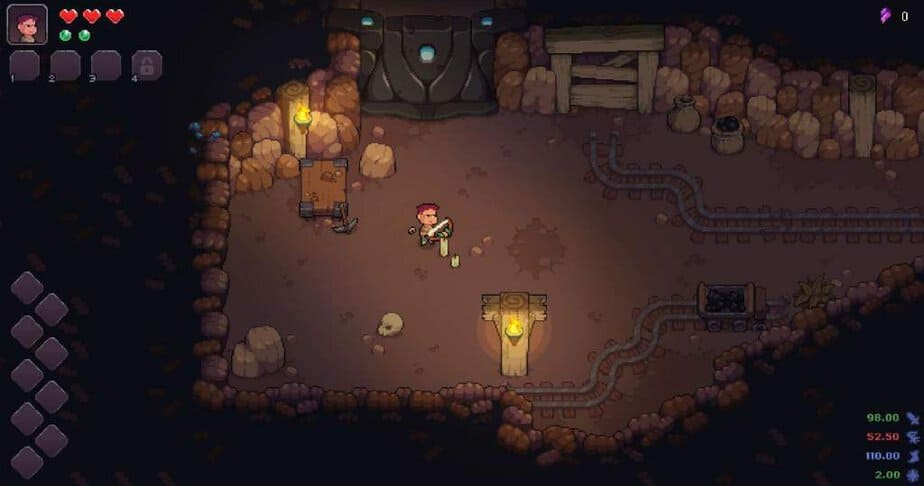
Season 1 starts with two weapon classes: Sword & Shield and Bow. Each weapon changes the way combat feels and affects which upgrades or synergies may be useful during a run.
- Sword & Shield: A close-range option built around survivability, crowd control, melee attacks, and a charged area attack.
- Bow: A ranged option focused on positioning, charged shots, mobility, and an area-of-effect arrow ability.
Both weapons use a primary attack, a secondary ability, and a dash. Dash is especially important because it helps players avoid damage and reposition during combat.
Community Tip: Choosing a First Weapon
Many early players recommend starting with the Bow. Its ranged attacks can make it easier to learn enemy patterns and avoid damage during the first few runs. Sword & Shield offers a tankier melee style, but it requires tighter positioning. New players can try both once they understand the basic dungeon flow.
Field Items
Field Items are consumables picked up from merchants inside the dungeon. Season 1 includes four: Swift Potion (movement speed boost, stackable), Bomb (area explosion), Heart Container (restores and raises max health by 1), and Vine Wave (temporarily traps nearby enemies).
Power-Ups and Build Crafting
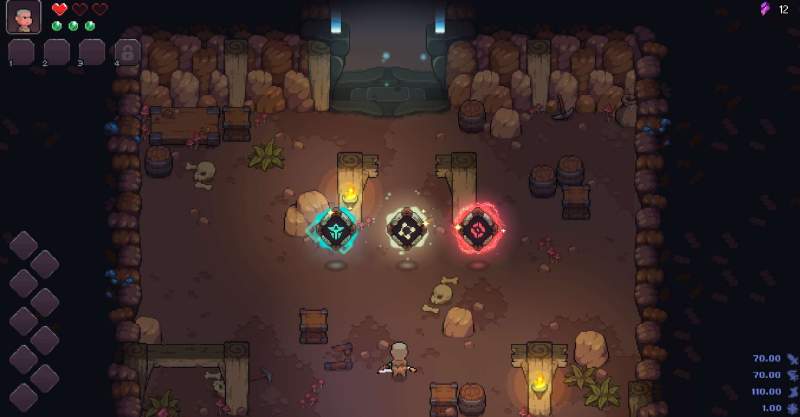
Power-Ups found during a run provide flat stat increases or change how combat works. There are three types: charms, pacts, and stat boosts.
Charms add combat effects such as Battle Trance (builds stacks on hit), Chain Lightning, Caustic Shields, and Mindless Rage, which increases the damage of the next attack with each hit but resets if you dash, use a Field Item, or take damage.
Pacts are higher-risk upgrades. Heroic Pact raises attack power but reduces max health. Pact of the Juggernaut increases damage and knockback but slows attack speed. Stat boosts cover Attack Power, Attack Speed, Dash Charges, and Movement Speed. More Power-Ups are expected throughout Season 1.
I found that stacking multiple charms creates a noticeable damage increase over a run. Vine Wave is also useful for controlling groups of enemies while learning dungeon layouts. For beginners, focusing on movement, dash use, and health management is usually the more practical approach during the first few runs.
How Stamina Works
Dungeon runs use stamina. A standard run costs 20 stamina, and players start with 100 maximum stamina by default. Stamina refills daily, allowing up to 5 standard runs per day.
Premium players can choose to commit more stamina to a single dungeon run. For example, instead of running several separate 20-stamina runs, a Premium player can commit up to 100 stamina to one run. Rewards scale proportionally with the amount of stamina committed, but this also increases risk because a bad run can affect more of the player’s daily stamina.
For beginners, it is better to start with standard dungeon runs until the combat, enemy patterns, and reward flow are clearer.
Dungeon Rewards and Umbra Shards
Umbra Shards are earned mainly through dungeon gameplay. Players earn them by defeating enemies during a run. Stronger enemies and deeper rooms can affect the amount of Umbra Shards earned.
A dungeon run is completed when the player reaches and clears the final room. Completing a run gives a multiplier to the Umbra Shards collected during that run. If a player dies, the run ends, but the Season 1 documentation states that players still keep the Umbra Shards collected before dying.
This makes early dungeon runs useful even if the player does not complete the full dungeon. Failed runs can still provide progression.
Chests and Rewards
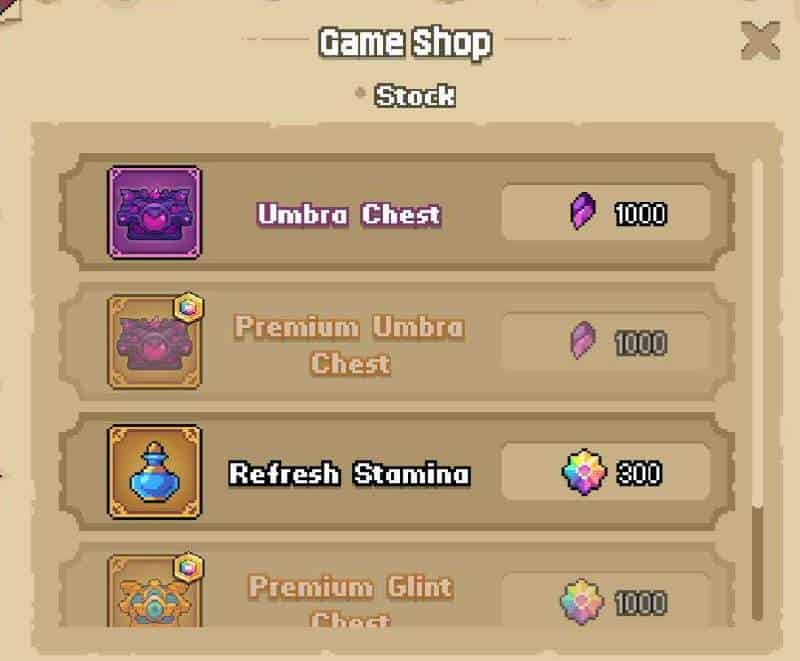
Chests are the main reward containers in Season 1. The main chest types are Umbra Chests, Kraken Chests, and Glint Chests. Each chest is connected to a different currency or activity path.
- Umbra Chests: Purchased from the Game Shop (press V to open) for 1,000 Umbra Shards each. This is the core dungeon reward path.
- Kraken Chests: Connected to Gobloonz and Kraken Klash.
- Glint Chests: Obtained with Glint and tied to Premium reward paths.
Season 1 chest rewards include cosmetics and BCN-related rewards. For free players, cosmetics are account-bound. For Premium players, cosmetics earned while Premium is active can be NFT-enabled.
The Beacon Currencies Explained
The Beacon Season 1 uses several currencies, and understanding them early makes the reward structure easier to follow.
| Currency | Main role |
|---|---|
| Umbra Shards | Main Season 1 gameplay currency earned from dungeon runs |
| Gobloonz | Currency used in Kraken Klash |
| Glint | Premium in-game currency used for premium features, consumables, Gobloonz, and Glint Chests |
| BCN | Ecosystem token connected to Season 1 reward pools, but not required to play |
Umbra Shards
Umbra Shards are the main gameplay currency of Season 1. They are earned through dungeon runs and act as the base progression currency. Players can use them to open Umbra Chests or convert them into Gobloonz.
Gobloonz
Gobloonz are used inside Kraken Klash. They can be obtained by converting Umbra Shards or through other paths such as Glint-related purchases.
Glint
Glint is The Beacon’s premium in-game currency. It can be used for Premium features, consumables, Gobloonz, and Glint Chests.
BCN
BCN is the broader ecosystem token. It is connected to Season 1 reward pools, but it is not required to play The Beacon.
Free vs Premium Access
The Beacon Season 1 can be played for free. Free players can run dungeons, earn Umbra Shards, open Umbra Chests, convert shards into Gobloonz, and participate in Kraken Klash.
The main limitation is that cosmetics earned as a free player are account-bound and cannot be traded or transferred.
Premium Access is unlocked through the Starter Pack. The Starter Pack costs $19.99 and includes 2,000 Glint, 100 Gobloonz, and Premium Access for Season 1. Premium changes the reward structure by enabling NFT cosmetics and broader chest reward access.
Players should not treat Premium as mandatory for learning the game. The free path is enough to understand the core dungeon loop before deciding whether the expanded reward structure is relevant.
What Is Kraken Klash?
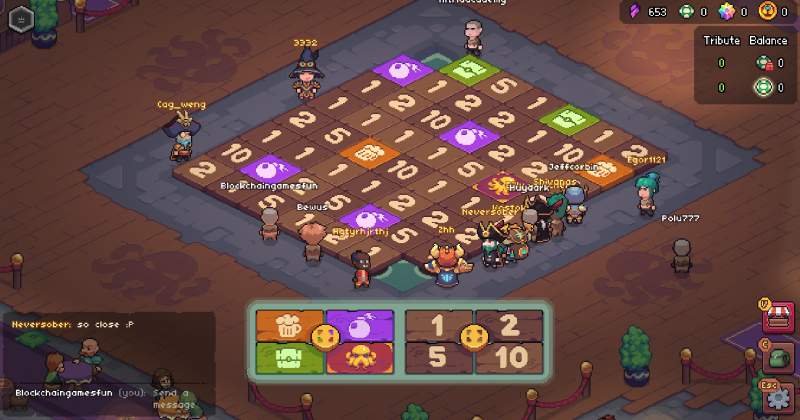
Kraken Klash is a prediction-based board activity inside The Cellar. The concept is loosely similar to roulette: players place their bets before the round resolves, and if the outcome does not match, the bet is lost. The mechanics are different, but the core idea of committing something before the result is revealed is the same.
In Kraken Klash, players use Gobloonz to tribute on tiles before a round begins. When the board resolves, the Kraken chooses a tile. If the chosen tile matches a player’s tribute, that tile’s outcome applies. If it lands elsewhere, the tribute is consumed. The board includes numbered tiles and minigame tiles, and players can tribute on multiple tiles per round, but once the timer ends, tributes are final.
For beginners, it is better to understand dungeon runs and Umbra Shards first before committing much to Kraken Klash.
Kraken Klash Tips for Beginners
Kraken Klash is higher-risk because Gobloonz placed on losing tiles are consumed. Beginners should start with small amounts and learn the board before committing larger amounts of Gobloonz.
- Board structure: The board includes numbered tiles and special minigame tiles.
- Small tributes first: Smaller tributes make it easier to understand how rounds resolve without using too many Gobloonz.
- Kraken Chest path: Player guides commonly reference Kraken Chests at 200 Gobloonz, so beginners may want to compare this path with single-tile tributes before spending.
- Shard conversion: Community guides report a rough conversion rate of 30 Umbra Shards per Gobloon, but players should confirm the current rate in-game because live-event values can change.
- Optional system: Dungeon runs and Umbra Chests remain the clearer starting path for new players.
Beginner Tips Before Playing
- Use Epic if browser access fails: The browser version may be less stable depending on the session, and the official docs recommend Epic if browser performance is poor.
- Check referral bonuses at signup: New accounts using a referral code may receive 50 Gobloonz and 1 free Umbra Chest. Check the signup flow and inventory after registration, since live-event bonuses may change.
- Start with normal dungeon runs: Learn the combat before worrying about advanced reward paths.
- Go north for dungeons: The dungeon entrance is through the northern gate in town.
- Find The Cellar later: Kraken Klash is to the northeast side of town, but it becomes more relevant after Gobloonz matter.
- Understand stamina first: Standard runs cost 20 stamina, with 100 maximum stamina by default.
- Check the controls: Movement uses W, A, S, and D, primary attack is left click, hold and release left click for a stronger charged attack, secondary attack is right click, dodge is Spacebar, and interact is E.
- Do not rush Premium: Free players can still access the main Season 1 loop.
- Check what each currency does: Umbra Shards, Gobloonz, Glint, and BCN all serve different roles.
- Treat Kraken Klash carefully: Gobloonz tributed to losing tiles are consumed.
- Explore vendors after the first run: The town has vendors and NPCs, but beginners do not need to understand every system before entering the first dungeon.
Final Notes
The Beacon Season 1 has several overlapping systems: dungeons, stamina, Umbra Shards, Gobloonz, Glint, chests, Premium access, and Kraken Klash. New players do not need to understand all of them immediately.
The most practical starting point is to enter through the most stable platform available, learn the town layout, run dungeons from the northern gate, collect Umbra Shards, and only then explore the deeper reward systems. Premium access and Kraken Klash can be evaluated after the basic dungeon loop is clear.
The Beacon Season 1 FAQ
Is The Beacon free to play?
Yes. The Beacon Season 1 can be played for free. Free players can run dungeons, earn Umbra Shards, open Umbra Chests, convert Umbra Shards into Gobloonz, and participate in Kraken Klash. Premium access is optional, but it changes the reward structure and enables NFT-enabled cosmetics for eligible items earned while Premium is active.
Should I play The Beacon through browser or Epic Games?
The Beacon is available through both browser access and the Epic Games Store. The official Season 1 documentation recommends using the Epic Games version if browser performance is poor. In early testing, the browser version had connection issues, while the Epic version allowed gameplay to start.
Where do I go first after entering town?
New players start in the town hub. The simplest first step is to go north toward the dungeon entrance, start a standard dungeon run, and learn the basic combat loop. The Cellar and Kraken Klash are located to the northeast, but they become more relevant after players understand Umbra Shards and Gobloonz.
How do I earn Umbra Shards?
Umbra Shards are earned mainly through dungeon runs. Players collect them by defeating enemies during a run. Completing the dungeon gives a multiplier to the Umbra Shards collected, but even failed runs can still provide shards if the player collected them before dying.
How do free players earn BCN rewards?
For free players, the clearest BCN reward path is to run dungeons, earn Umbra Shards, and use those shards to open Umbra Chests. The Season 1 documentation says free players have access to BCN rewards in a more limited capacity, while Premium players have broader reward access.
Do I need to open Umbra Chests for BCN rewards?
Yes, opening chests appears to be important. Season 1 reward distribution is tied mainly to chest openings, and Umbra Chests are the main free-player chest path connected to dungeon-earned Umbra Shards. Players should not assume that simply holding unopened chests gives the same result.
What is Kraken Klash?
Kraken Klash is a prediction-based board activity inside The Cellar. Players use Gobloonz to tribute on tiles before a round begins. If the Kraken lands on a tile where the player placed Gobloonz, that tile’s outcome applies. If it lands elsewhere, the tributed Gobloonz are consumed.
Which weapon is better for beginners?
Many early players prefer the Bow because ranged attacks make it easier to learn enemy patterns and avoid damage. Sword & Shield can work, but it requires closer positioning and may feel harder during the first few runs.


